Project Odessy
Engine: Unreal Engine
Genre: Third person shooter
Platform: PC
Team size: solo project
Aboute the project
This is a third person shooter game I am currently working on where trying out new things like making my own ability system and using slate to make UI instead of using unreals user widgets. When working on this project I am trying to make as mush as possible in C++ and I have only used blueprints when I work with changing the color or collisions of mesh and sometimes in UIs that are not made in slate
UI
Unreal Engine Slate UI
In this project currently all the UI is made using Slate instead of userwidgets. I decided to use slate because I wanted to try different ways to make UI in unreal engine. The UI I have currently made is the health bar for the player, ammo display for the guns and the UI for the ability cooldown's. Learning slate was difficult in the beginning when I didn't know how you did everything but it became les difficult as time when on. the most difficult part of making UI using slate is when I hade to get a shader from the editor and put it on a image, this was solved by having a variable of that shader in the hud class that the UI can axes.
One of the issues I hade when working with slate was that the game would crash after around 30 seconds and I later found the material instance pointers inside the UI class where geting deleted because the slate UI class is not a UObject. I managed to fix the issue by having the pointers for the material instances in the hud class that the UI have axes to.


User Widgets
The only UIs in the project at the moment that uses user widgets is the UI for the buff, debuff display and the UI for the building interactions. Why I used user widgets for those UIs is because I couldn't figure out how to add objects to a Vertical box in runtime using slate so until I figure out how to do that the buff, debuff display and the UI for the building interactions are going to use user widgets instead of slate
Compass UI
For the compass UI I decided to use user widget instead of slate UI. The player modifies the UV of the compass UI to make it rotate with the player. For the compass indicators I use a actor component that handle the creation of the UI and what icon the marker is suppose to have and the UI handles where on the compass the icon is suppose to be positioned so it matches the position of the actor that icon is tracking.
On/Off Screen Indicator
The on/off screen indicator in this project is used for showing where important objects that are not on the screen are located.The off screen indicator uses the same actor component for the creation of the UI so one object can have both a compass and off screen indocator. If the target the indicator is tracking is off screen the UI gets the closest edge off the screen to where the target is located and then updates the indicator to be att that position then rotates the indicator to point to that edge to shop in witch direction the target is.
The current version of the compass indicator
The current version of the off screen indicator
Minimap/MapMarker
The minimap uses a camera to capture a image of the entire map and ads it to a shader that the minimap can use to display the level and the zooms in so only part of the map is shown and sets the center of the minimap to where the player is located.
The minimap markers uses the same actor component as the compass and the offscreen indicators to select the targets of the markers. Each marker has a variable that is the object that the marker is suppose to follow. The minimap calculates the position the marker is suppose to be at on the minimap using the location of the markes target and the players current position and rotation.
You can select if the marker should disappear when exiting the minimap area or clamp to the edge of the minimap.
Marker disappear when exiting the minimap area
Marker clamps to the edge when exiting the minimap area
Ability system
In this project I wanted to try to make my own ability system for the game. The current Iteration of my ability systems works by having a objects in the world that has all the logic for each ability inside of it and the player have axes to all of those objects. When making the ability system I tried to make it as scalable as possible so it can work with different type of ability's.
For information and examples of the currently made abilitys pres the Ability Demos Button
Buff / Debuff system
The buff system uses classes that inherits from UObject that have to logic for each buff and data assets for what class the buff is and all info for the UI. When a new buff is applied I use the NewObject function to make the buff object and then add it to the list of buffs inside the player. Currently all the duration countdown is handled by the player. Currently the buffs can only effect damage, reload speed, movement speed and damage mitigation.
Weapon System
Gun / Range weapons
The weapon system I made for the game is created to be scalable. when I create a new gun I can use the same base class and change the stats in the editor to make the gun act differently. The type of guns I can make currently are full auto, semi auto, charge (increases projectile speed and damage the longer you hold down the fire button) and burst guns and I am planning on adding more gun types. The most challenging of the gun types to implement was the burst option and that was because after every shot I hade to check how many shoots hade been fired and if they where less then the amount of shots ber burst or if the shots left in the burst is less then the remaining bullets in the guns magazine so it knows if it has to stop the burst midway trough .The gun is a separate actor that is attached to the player when equipped, the player has a variable that is the equipped gun so the player can use it.
Melee weapons
The weapon systems also works with melee weapons because both the melee and the range weapons use a delegate to bind functions that are called when the player presses the fire button(left mouse button) and the weapon script has the logic for what it is suppose to do when the weapon is used.
The current version of the melee system uses a timeline to lerp the rotation and position of the weapon to simulate a animation because I don't have a character with a rig so I cant attach the weapon the hand bone and animate the weapon attack
Full auto
semi auto
burst
charge
Current iteration of the melee weapon
Build System
Current version of the build system
In this project I made a build system that gives the player the ability to place structures inside a building grid.
Currently the building grid is a 2 dimensional grid that is created and the grid controller is in the center of the grid. The grid system has a function to get the closest node in the grid from where the player is aiming and is used for moving the ghost of the building you want to make.
The player has a component that is the building system and has a list of all buildings the player can build. When the player selects a building the build system first checks the players inventory to se if the player has enough items to build it and if it duos the hologram of the building turns green and if not it turns red.
Inventory System
The Inventory system I developed for this project uses a actor component that has the list of items in the inventory and the functions for adding items, using items and checking if you have enough items in the inventory.
When making the UI for the inventory system I decided that I wanted add a system so the player can move the items around the inventory and if you want to place a item on a inventory slot that is already occupied they switch places. That system uses the location of the inventory slots to find the closest slot to the mouse cursor so when you stop holding down the mouse button on the item it will set its own position the the closest inventory slot.
The biggest challenge when making the system for moving Items around is that in the beginning the inventory slots where all in a wrap box but the problem was that when inside the wrap box the transform did not change. To fix that I hade to make the inventory slots spawn in a 2d grid manually by using two for loops where one is X and the other is Y to generate the locations for each inventory slot instead of using a wrap box so the transform of the slots actually changes and then how I wanted to design the system for moving items actually worked.
The inventory UI
Crafting system/ building interaction
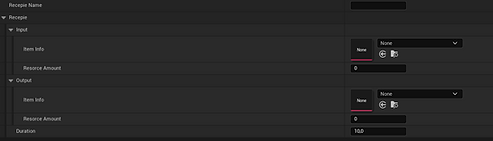
How the recipe data asset currently looks like
How crafting currently looks like
Together with the building system mentioned before I implemented a system for interacting with the buildings witch is when you press [E] when standing next to the building and when interacting the UI for that building appears and if it is a crafting building all the recipes for that building shows up on the left side of the UI.
The current building I have implemented is a building that the player uses to craft new items. In the crafting system I made uses a data asset that contains the input items, output items and the duration of the craft. Both the input and the output items are structs that contain the icon, name and how many of that items is used ore made. The current version of the crafting systems allows the player to craft 6 items at one time.
Currently when the player starts to craft in one of the buildings the building takes the resource required for the craft from the players inventory. When the craft is complete the output item is placed in the buildings inventory and the player have to go interact with the building and press the collect recourses button to get all the crafted items.
Mining system
The current iteration of the mining system I am developing currently uses the weapons the player has to mine because I haven't implemented the tool/ability the player is meant to use for mining.
When the player destroys a ore node a item pickup for the item the ore node gives will appear where the node was and when the player touch the pickup the item will be added to the player inventory.
All ore nodes will respawn when you go back from the building zone to the exploration zone.
How mining currently looks like
Enemy AI
Field Of View script

How the enemy behavior looks like
For the enemy's in the project I use unreals behavior tree to control what the enemy douse
The current logic of the enemy is, when a enemy find a player using a field of view script so the enemy only finds the player when the player is infront of the enemy and then move towards the player and when they reach the player they will attack. When a enemy dies the actor wont be destroyed instead the actor will hide itself and turn off all collision and stop the behavior tree so that actor can later be reused when the enemy's respawn so I don't spawned and destroy actors when enemy's die and respawn.
The enemy's are spawned by a object that generates the spawn coordinates and keeps track of what enemy's it has spawned.
UI Minigames
Maze minigame
I wanted to try to make a UI minigame for opening a gate and I decided on a maze like minigame where you have to move a marker from start to finish without moving over tiles you have walked on before.
When you reach the goal the minigame is going to broadcast that the minigame is finished using a delegate so any code can use the minigame and get a callback when the minigame is finished.